
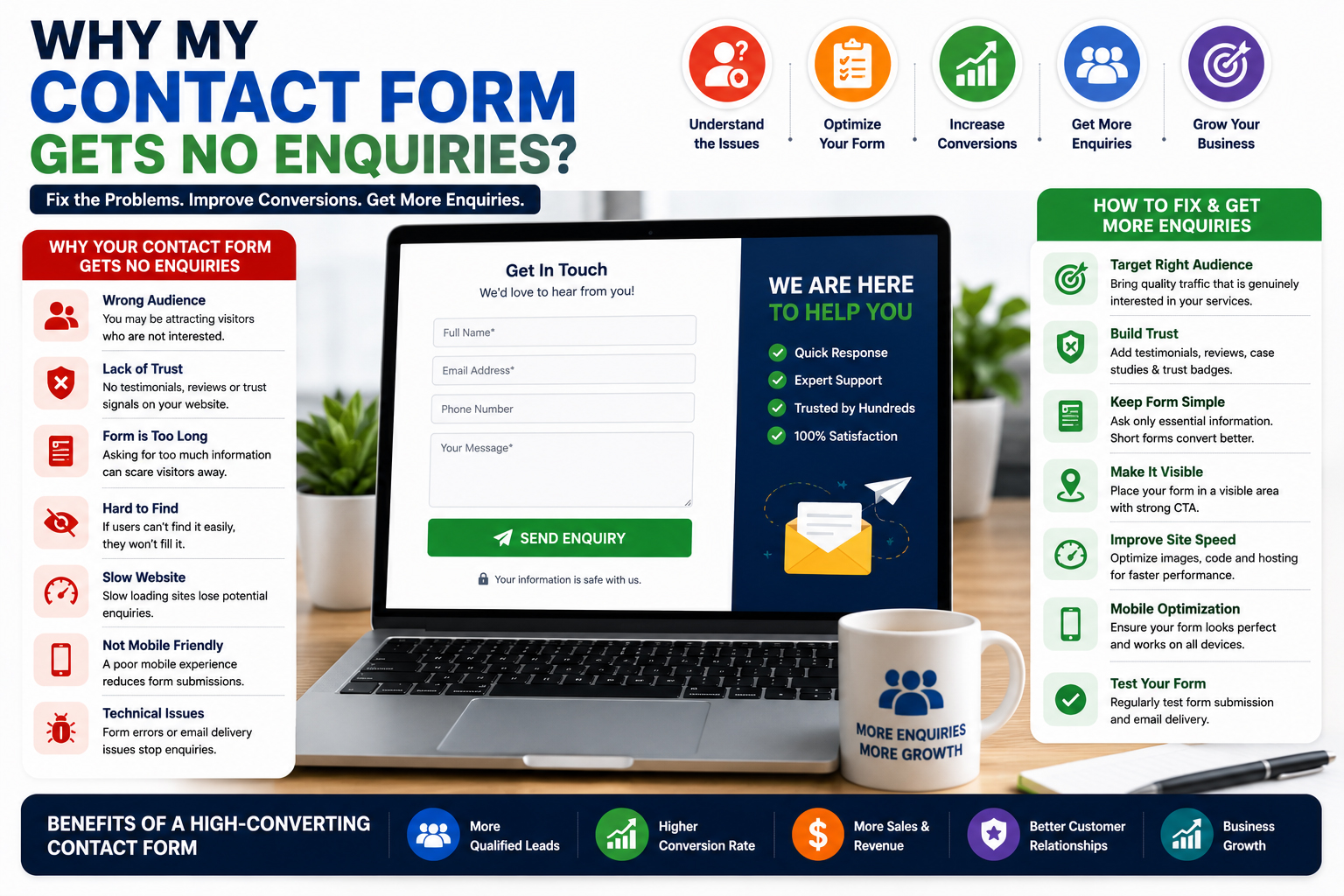
Why My Contact Form Gets No Enquiries
Many business owners invest time and money into creating a professional website, driving traffic through SEO and digital marketing, and showcasing their services online. However, despite receiving visitors, they often face a frustrating problem: Why My Contact Form Gets No Enquiries.
A contact form is one of the most important lead generation tools on a website. It provides visitors with a quick and convenient way to connect with your business. When the contact form fails to generate enquiries, it can significantly impact sales opportunities, customer acquisition, and business growth.
Understanding Why My Contact Form Gets No Enquiries requires looking beyond the form itself. The issue may involve user experience, trust, website design, traffic quality, form complexity, messaging, or technical problems. Even a small issue can dramatically reduce the number of enquiries your business receives.
Businesses that identify and fix these barriers often experience a substantial increase in lead generation and customer engagement.
Common Reasons Why My Contact Form Gets No Enquiries
Many contact forms fail not because visitors are uninterested, but because something in the user journey prevents them from taking action.
Your Website Is Attracting the Wrong Visitors
One of the most common reasons for low enquiry rates is poor traffic quality.
If visitors arrive on your website without genuine interest in your products or services, they are unlikely to submit an enquiry form.
Businesses should focus on attracting:
- Qualified visitors
- Relevant search traffic
- Industry-specific audiences
- High-intent users
Targeted traffic is far more likely to convert into genuine enquiries.
Visitors Do Not Trust Your Business
Trust is essential before someone shares personal information.
When visitors feel uncertain about your business, they often leave without contacting you.
Important trust-building elements include:
- Customer testimonials
- Online reviews
- Case studies
- Company information
- Security certificates
- Client logos
The more confidence visitors have in your business, the more likely they are to complete your contact form.
The Contact Form Is Too Long
Many businesses ask for too much information upfront.
Visitors often hesitate when forms require:
- Full addresses
- Detailed company information
- Multiple phone numbers
- Excessive personal details
Long forms create friction and reduce completion rates.
In many cases, collecting only:
- Name
- Phone Number
- Message
is enough to begin a conversation.
Your Call-to-Action Is Weak
A contact form needs a strong reason for visitors to take action.
Generic buttons such as:
- Submit
- Send
often perform poorly.
More effective calls-to-action include:
- Request a Free Quote
- Get Expert Advice
- Schedule a Consultation
- Start Your Project Today
- Contact Our Team
Strong calls-to-action help motivate users to complete the form.
The Form Is Difficult to Find
Some websites hide contact forms deep within pages or make them difficult to locate.
Visitors should never have to search extensively for a way to contact your business.
Best practices include:
- Visible contact buttons
- Dedicated contact pages
- Contact forms above the fold
- Sticky contact options
Easy accessibility improves enquiry rates.
Your Website Looks Unprofessional
Visitors often judge credibility within seconds.
An outdated or poorly designed website can reduce confidence and discourage form submissions.
Common issues include:
- Outdated design
- Poor navigation
- Broken pages
- Low-quality images
- Inconsistent branding
Professional websites help establish trust and improve lead generation.
Businesses looking to improve their online presence can benefit from services such as https://hrweb99.com/dynamic-website that focus on user experience and conversion optimization.
Slow Website Speed
Website speed affects every aspect of user engagement.
Visitors often abandon websites that take too long to load.
Slow performance may result from:
- Large images
- Poor hosting
- Excessive scripts
- Unoptimized code
Businesses can identify speed issues using Google PageSpeed Insights.
Fast websites create better user experiences and support higher conversion rates.
Visitors Do Not Understand Your Services
Many websites fail to communicate value clearly.
Before submitting an enquiry, visitors want to understand:
- What you offer
- How you can help
- What makes you different
- Why they should choose your company
Confusing or vague messaging often results in missed opportunities.
Mobile Experience Is Poor
A large percentage of website visitors browse using mobile devices.
If the contact form does not function properly on smartphones or tablets, users may abandon it.
Common mobile problems include:
- Small form fields
- Difficult navigation
- Slow loading pages
- Unresponsive buttons
Mobile optimization is critical for lead generation success.
No Urgency or Incentive
Visitors sometimes postpone contacting a business because there is no compelling reason to act immediately.
Adding incentives may improve enquiry rates.
Examples include:
- Free consultations
- Free website audits
- Quick response guarantees
- Free quotations
Creating urgency encourages action.
Technical Problems Prevent Submissions
Some websites lose enquiries due to hidden technical issues.
Examples include:
- Form errors
- Email delivery failures
- Broken integrations
- Validation problems
- Server issues
Regular testing is essential to ensure contact forms function correctly.
Businesses should periodically submit test enquiries to verify proper operation.
Lack of Social Proof
People often seek reassurance before contacting a business.
Social proof can include:
- Reviews
- Testimonials
- Success stories
- Awards
- Certifications
Positive feedback helps reduce hesitation and increase trust.
Contact Page Lacks Important Information
Visitors may avoid submitting forms if they cannot verify that a real business exists behind the website.
A strong contact page should include:
- Business address
- Phone number
- Email address
- Business hours
- Company details
Transparency improves credibility.
Too Many Required Fields
Every additional required field increases the chance that visitors will abandon the form.
Businesses should only request information that is absolutely necessary.
Shorter forms generally achieve higher conversion rates.
Website Traffic Is Too Low
Sometimes the contact form itself is not the problem.
If very few visitors reach the website, enquiry volume will naturally remain low.
Businesses should focus on:
- SEO
- Content marketing
- Social media marketing
- Local visibility
- Paid advertising
More targeted traffic creates more opportunities for enquiries.
Poor Landing Page Experience
Visitors often arrive on service pages before reaching the contact form.
If those pages fail to engage users, they may never reach the enquiry stage.
Effective landing pages should provide:
- Clear benefits
- Strong headlines
- Trust signals
- Service details
- Calls-to-action
A well-designed landing page helps move visitors toward form submission.
Content Does Not Build Confidence
Content should answer visitor questions and remove doubts.
Potential customers often want to know:
- How the process works
- What results they can expect
- Why they should trust your business
Helpful content builds confidence and increases enquiry likelihood.
According to recommendations from Google Search Central, content should prioritize user value and address real customer needs.
You Are Not Monitoring User Behavior
Many businesses fail to understand where visitors drop off during the enquiry process.
Analyzing behavior can reveal:
- Form abandonment points
- High-exit pages
- User frustrations
- Conversion barriers
Tools such as Google Analytics provide valuable insights into visitor interactions and conversion performance.
How to Increase Contact Form Enquiries
Improving enquiry rates often requires multiple optimizations working together.
Businesses should focus on:
- Simplifying forms
- Improving trust signals
- Enhancing website speed
- Strengthening calls-to-action
- Optimizing mobile usability
- Testing technical functionality
- Increasing targeted traffic
- Creating compelling offers
Small improvements can produce significant increases in lead generation.
Businesses asking Why My Contact Form Gets No Enquiries often discover that the problem is not the form itself but the overall user experience surrounding it. Visitors need trust, clarity, convenience, and motivation before they decide to submit their information.
A successful contact form should be easy to find, simple to complete, and supported by a website that builds credibility and communicates value. Every element—from page speed and design to messaging and trust signals—contributes to conversion success.
Organizations that understand Why My Contact Form Gets No Enquiries can identify weaknesses, improve user journeys, and generate more qualified leads. By continuously testing and optimizing the enquiry process, businesses can transform their websites into powerful lead generation tools.
Ultimately, the answer to Why My Contact Form Gets No Enquiries lies in creating a user-focused experience that removes obstacles, builds confidence, and encourages visitors to take action. When these elements work together effectively, contact forms become one of the most valuable assets for business growth and customer acquisition.



Leave a Reply