
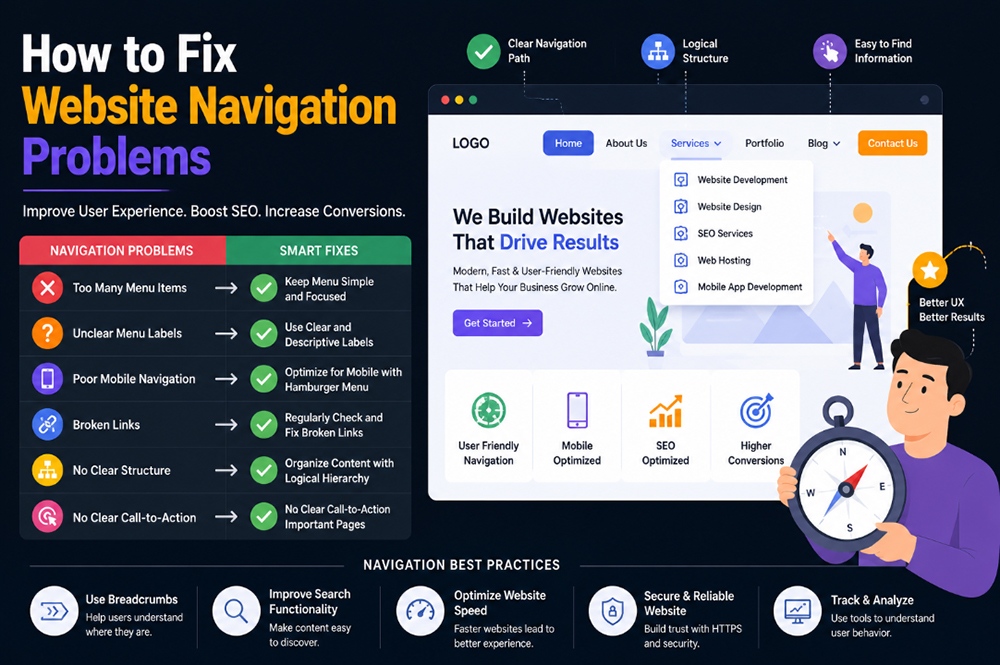
Website navigation plays a crucial role in user experience and search engine optimization. No matter how attractive your website looks, visitors may leave quickly if they cannot find the information they need. Poor navigation not only frustrates users but also reduces conversions, increases bounce rates, and negatively impacts SEO performance.
Many Indian businesses invest in website design and digital marketing but overlook navigation structure. Whether you run an eCommerce store, educational portal, corporate website, or service-based business, fixing website navigation problems can significantly improve customer engagement and lead generation.
Why Website Navigation Matters
Navigation acts as a roadmap for visitors. It helps users move between pages and locate products, services, contact details, and important information quickly.
Good navigation provides:
- Better user experience
- Improved website engagement
- Higher conversion rates
- Better SEO performance
- Reduced bounce rates
- Increased page views
If visitors struggle to navigate your website, they may leave and choose a competitor instead.
Common Website Navigation Problems
Too Many Menu Items
Many businesses try to include every page in the main menu. This creates confusion and makes navigation cluttered.
Instead, keep your primary menu focused on key sections such as:
- Home
- About Us
- Services
- Portfolio
- Blog
- Contact Us
A clean navigation structure helps users find information faster.
Unclear Menu Labels
Menu names should be simple and easy to understand. Avoid technical terms or creative names that visitors may not recognize.
For example:
✔ Website Development Services
✔ SEO Services
✔ Mobile App Development
❌ Digital Ecosystem Solutions
Simple navigation improves usability and accessibility.
Poor Mobile Navigation
Most Indian users browse websites using smartphones. If your menu is difficult to use on mobile devices, visitors may leave immediately.
Responsive navigation should include:
- Mobile-friendly menus
- Fast loading speed
- Easy-to-click buttons
- Clear navigation hierarchy
Improve Internal Linking
Internal links help users discover important pages while improving SEO.
Useful internal links include:
- Website Development Services: https://hrweb99.com/india/website-development-company
- Website Design Company: https://hrweb99.com/india/website-design-company
- SEO Services: https://hrweb99.com/india/seo-services
- Web Hosting Services: https://hrweb99.com/india/web-hosting
- Mobile App Development: https://hrweb99.com/india/mobile-app-development
- Portfolio / Showcase: https://hrweb99.com/india/showcase
Strategic internal linking improves crawlability and keeps visitors engaged longer.
Use Breadcrumb Navigation
Breadcrumbs help visitors understand where they are on a website.
Example:
Home > Services > Website Development > Custom Website Development
Breadcrumbs improve navigation while helping search engines understand website structure.
Fix Broken Links
Broken links create poor user experiences and can damage SEO rankings.
Regularly audit your website and remove:
- 404 errors
- Redirect loops
- Outdated URLs
- Missing pages
Google Search Console can help identify navigation and indexing issues.
Optimize Website Speed
Slow websites make navigation feel frustrating.
Use tools like:
- Google PageSpeed Insights: https://pagespeed.web.dev/
- Google Search Console: https://search.google.com/search-console
- Google Analytics: https://analytics.google.com/
These platforms help identify performance issues affecting user experience.
Create a Clear Website Structure
Visitors should reach important pages within three clicks.
Recommended structure:
Home
├── About
├── Services
│ ├── Website Development
│ ├── Website Design
│ ├── SEO Services
│ └── Mobile App Development
├── Portfolio
├── Blog
└── Contact
A logical structure improves both SEO and usability.
Follow Web Standards
Professional websites should follow recognized standards.
Helpful resources include:
- W3C Web Standards: https://www.w3.org/
- Google Developers: https://developers.google.com/search/docs
- Mozilla Developer Network: https://developer.mozilla.org/
- Schema.org: https://schema.org/
Following these guidelines improves accessibility, performance, and search visibility.
Use Call-to-Action Navigation
Important actions should always be visible.
Examples include:
- Request a Quote
- Contact Us
- Get Free Consultation
- View Portfolio
These buttons guide visitors toward conversion-focused actions.
Conclusion
Website navigation problems can significantly reduce traffic value, conversions, and customer satisfaction. By simplifying menus, improving mobile usability, fixing broken links, implementing internal linking, and optimizing website structure, businesses can create better user experiences and stronger SEO performance.
For Indian businesses competing online, navigation optimization is one of the easiest ways to improve engagement and generate more leads. A well-structured website helps visitors find information quickly, builds trust, and supports long-term business growth.


Leave a Reply